


Listings Monitor
See where Google, Apple Maps, TomTom and HERE get your details wrong.
Listings Monitor compares the details you entered on Openingstijden.nl with your listings on Google, Apple Maps, TomTom and HERE, field by field. TomTom and HERE are the maps used in many car navigation systems. Free checks once a month and counts the differences. Premium checks every day, shows each difference with both values and emails you when one is new or changes.Listings Monitor compares the details you entered on Openuren.be with your listings on Google, Apple Maps, TomTom and HERE, field by field. TomTom and HERE are the maps used in many car navigation systems. Free checks once a month and counts the differences. Premium checks every day, shows each difference with both values and emails you when one is new or changes.Listings Monitor compares the details you entered on Oeffnungszeiten.com with your listings on Google, Apple Maps, TomTom and HERE, field by field. TomTom and HERE are the maps used in many car navigation systems. Free checks once a month and counts the differences. Premium checks every day, shows each difference with both values and emails you when one is new or changes.Listings Monitor compares the details you entered on Horaire.com with your listings on Google, Apple Maps, TomTom and HERE, field by field. TomTom and HERE are the maps used in many car navigation systems. Free checks once a month and counts the differences. Premium checks every day, shows each difference with both values and emails you when one is new or changes.Listings Monitor compares the details you entered on Opening-times.co.uk with your listings on Google, Apple Maps, TomTom and HERE, field by field. TomTom and HERE are the maps used in many car navigation systems. Free checks once a month and counts the differences. Premium checks every day, shows each difference with both values and emails you when one is new or changes.Listings Monitor compares the details you entered on Hours.com with your listings on Google, Apple Maps, TomTom and HERE, field by field. TomTom and HERE are the maps used in many car navigation systems. Free checks once a month and counts the differences. Premium checks every day, shows each difference with both values and emails you when one is new or changes.Listings Monitor compares the details you entered on our directory in your country with your listings on Google, Apple Maps, TomTom and HERE, field by field. TomTom and HERE are the maps used in many car navigation systems. Free checks once a month and counts the differences. Premium checks every day, shows each difference with both values and emails you when one is new or changes.
Scan results
Your details next to every platform, field by field
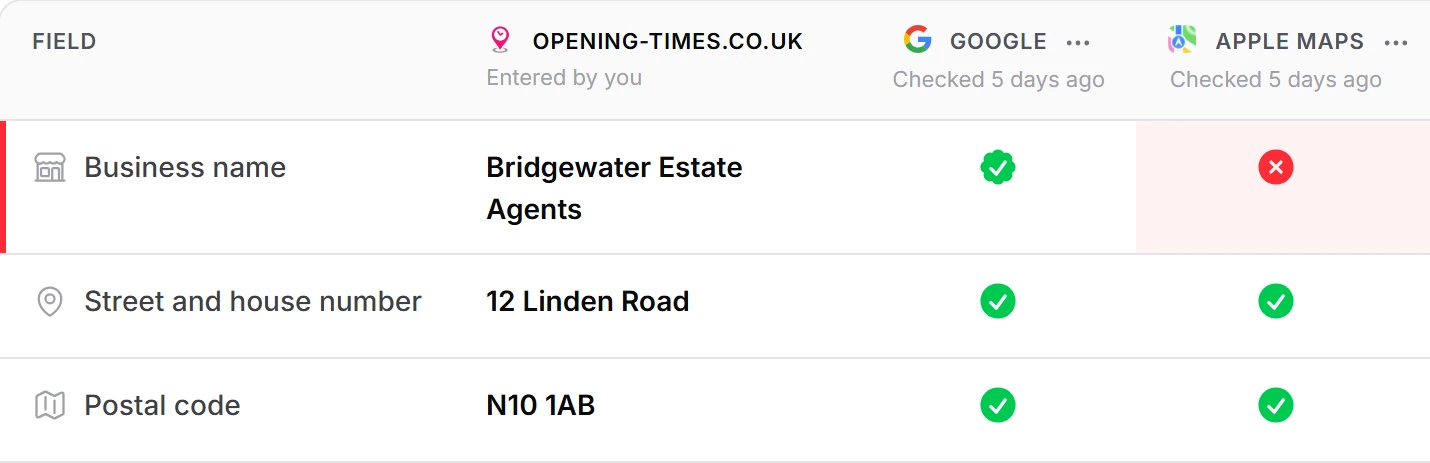
On Premium, Scan results puts your own details in the first column: what you entered for Openingstijden.nl. Next to it comes one column for every platform your location was found on, with the time it was last checked. Every field gets one status per platform.On Premium, Scan results puts your own details in the first column: what you entered for Openuren.be. Next to it comes one column for every platform your location was found on, with the time it was last checked. Every field gets one status per platform.On Premium, Scan results puts your own details in the first column: what you entered for Oeffnungszeiten.com. Next to it comes one column for every platform your location was found on, with the time it was last checked. Every field gets one status per platform.On Premium, Scan results puts your own details in the first column: what you entered for Horaire.com. Next to it comes one column for every platform your location was found on, with the time it was last checked. Every field gets one status per platform.On Premium, Scan results puts your own details in the first column: what you entered for Opening-times.co.uk. Next to it comes one column for every platform your location was found on, with the time it was last checked. Every field gets one status per platform.On Premium, Scan results puts your own details in the first column: what you entered for Hours.com. Next to it comes one column for every platform your location was found on, with the time it was last checked. Every field gets one status per platform.On Premium, Scan results puts your own details in the first column: what you entered for our directory in your country. Next to it comes one column for every platform your location was found on, with the time it was last checked. Every field gets one status per platform.
Small differences in writing are no difference. Capitals, dots and commas in a name, street or town do not count. In a phone number only the digits count, so spaces, dashes and brackets make no difference. In a web address, www, http or https, a closing slash and tracking codes such as utm_source are left out. A map pin up to 50 m from yours matches.
Listings Monitor finds your listing on each platform from your name and address. Linked to the wrong one? Change link, in the menu of each platform column, lets you search that platform and pick the right listing, or say the platform does not have your location.
- Matches: the platform shows what you entered
- Different: the platform shows another value
- Missing: one side has no value
- Partial match: close, but worth a look, such as a map pin 50 to 150 m away, a house number inside a range like 220-230, or categories that share at least one
- Grey: the platform does not share this field
Inconsistencies
Every difference with both values, and a link to your listing
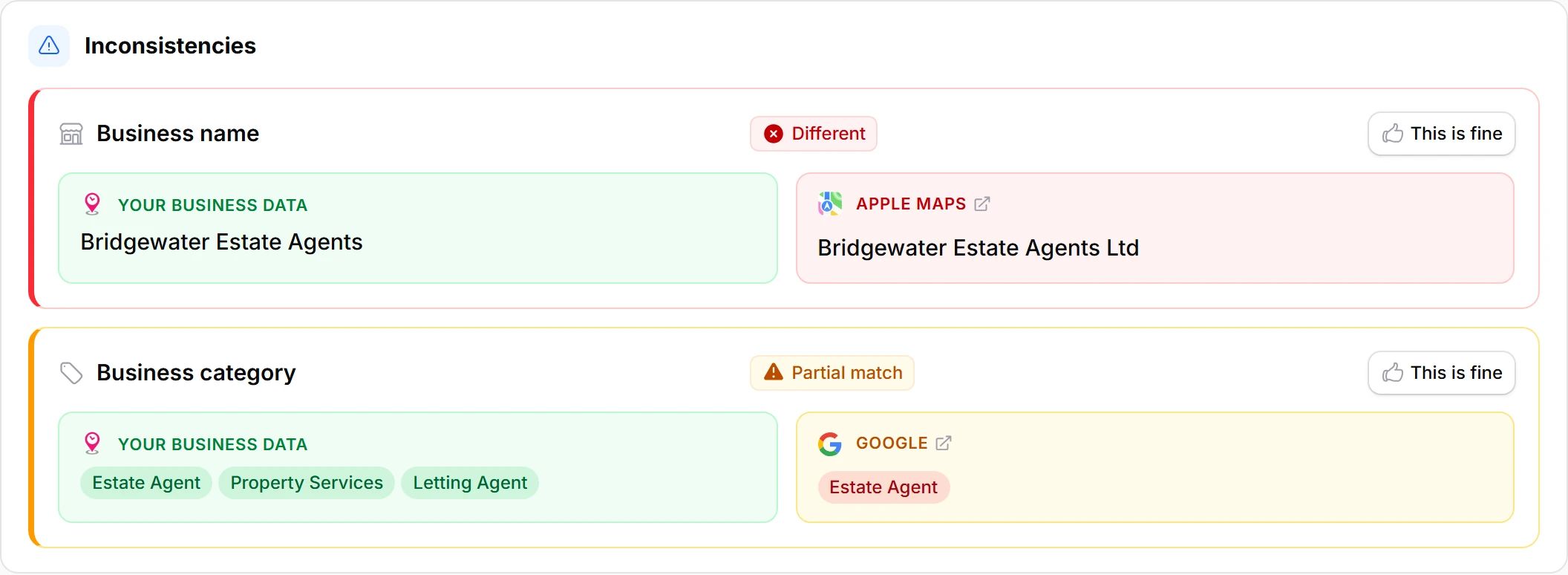
On Premium, every difference has its own row under Inconsistencies: the field, the platform and what is wrong, such as Different or Missing. Your value and the platform's value sit side by side. For opening hours, the days that differ are marked.
Click the platform name to open your listing there, in a new tab. You correct it on the platform itself: Listings Monitor reads Google, Apple Maps, TomTom and HERE, it never changes them. Once the platform shows the right value, the next check sees it and the difference leaves your list by itself.
Is a difference fine, such as a shorter name on Apple Maps? Click This is fine. It stops counting as long as both values stay the same, and moves to Accepted, where you can undo it.
- An email when a difference is new, comes back or changes
- One email per location per check, with every new difference in it
- Sent to everyone in your account with a confirmed email address
- No second email for a difference that stays the same
Free and Premium
Free counts your differences. Premium checks every day.
On Free, every location is checked once a month on Google, Apple Maps, TomTom and HERE. You see how many differences were found, such as “3 errors were found in your listings”. Which fields and which platforms they are comes with Premium.
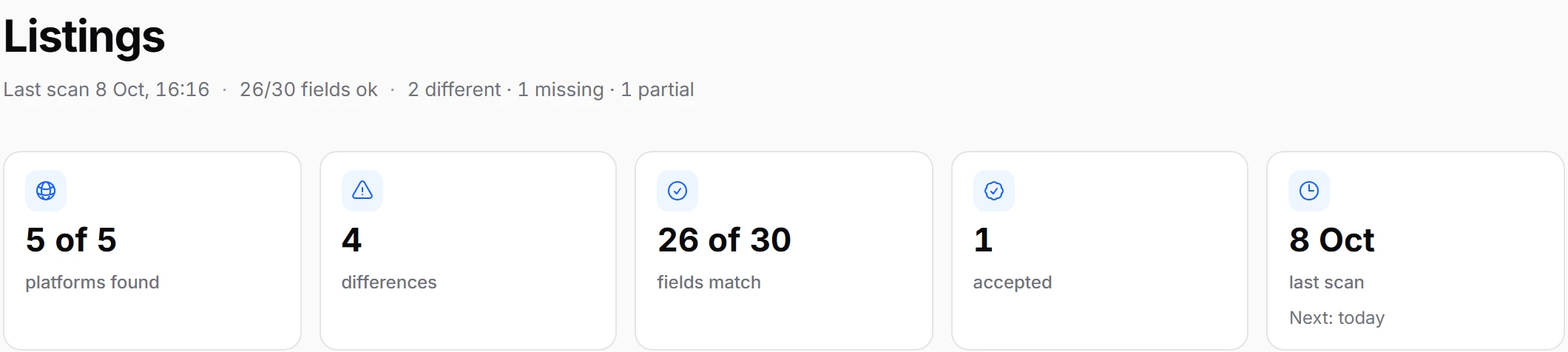
Premium checks every Premium location every day, by itself. The first check starts as soon as you pay. Five tiles at the top of the page count what the last check found.
With two or more locations, All listings puts them in one table, the most differences first.
- Platforms: on how many your listing was found, Openingstijden.nl included, such as 5 of 5Platforms: on how many your listing was found, Openuren.be included, such as 5 of 5Platforms: on how many your listing was found, Oeffnungszeiten.com included, such as 5 of 5Platforms: on how many your listing was found, Horaire.com included, such as 5 of 5Platforms: on how many your listing was found, Opening-times.co.uk included, such as 5 of 5Platforms: on how many your listing was found, Hours.com included, such as 5 of 5Platforms: on how many your listing was found, our directory in your country included, such as 5 of 5
- Differences: the ones still open
- Fields: how many of the compared fields match, such as 26 of 30
- Accepted: the differences you marked as fine
- Last scan: its date, and the date of the next one
The fields Listings Monitor compares on each platform
| Field | Apple Maps | TomTom | HERE | |
|---|---|---|---|---|
| Business name | Yes | Yes | Yes | Yes |
| Street and house number | Yes | Yes | Yes | Yes |
| Postal code | Yes | Yes | Yes | Yes |
| Town or city | Yes | Yes | Yes | Yes |
| Map pin | Yes | Yes | Yes | Yes |
| Phone number | Yes | No | Yes | Yes |
| Website | Yes | No | Yes | Yes |
| Opening hours | Yes | No | No | Yes |
| Business category | Yes | No | No | No |
| Operating status: open, temporarily or permanently closed | Yes | No | No | No |
Frequently asked questions
What is a listings monitor?
A listings monitor checks your business details on the platforms where customers look you up, and flags every place they differ from yours. Listings Monitor compares your details on Openingstijden.nl with Google, Apple Maps, TomTom and HERE, field by field.A listings monitor checks your business details on the platforms where customers look you up, and flags every place they differ from yours. Listings Monitor compares your details on Openuren.be with Google, Apple Maps, TomTom and HERE, field by field.A listings monitor checks your business details on the platforms where customers look you up, and flags every place they differ from yours. Listings Monitor compares your details on Oeffnungszeiten.com with Google, Apple Maps, TomTom and HERE, field by field.A listings monitor checks your business details on the platforms where customers look you up, and flags every place they differ from yours. Listings Monitor compares your details on Horaire.com with Google, Apple Maps, TomTom and HERE, field by field.A listings monitor checks your business details on the platforms where customers look you up, and flags every place they differ from yours. Listings Monitor compares your details on Opening-times.co.uk with Google, Apple Maps, TomTom and HERE, field by field.A listings monitor checks your business details on the platforms where customers look you up, and flags every place they differ from yours. Listings Monitor compares your details on Hours.com with Google, Apple Maps, TomTom and HERE, field by field.A listings monitor checks your business details on the platforms where customers look you up, and flags every place they differ from yours. Listings Monitor compares your details on our directory in your country with Google, Apple Maps, TomTom and HERE, field by field.
Which platforms does Listings Monitor check?
Google, Apple Maps, TomTom and HERE. Your listing on each platform is found by itself, from your name and address. Your own details on Openingstijden.nl are what every platform is compared with.Google, Apple Maps, TomTom and HERE. Your listing on each platform is found by itself, from your name and address. Your own details on Openuren.be are what every platform is compared with.Google, Apple Maps, TomTom and HERE. Your listing on each platform is found by itself, from your name and address. Your own details on Oeffnungszeiten.com are what every platform is compared with.Google, Apple Maps, TomTom and HERE. Your listing on each platform is found by itself, from your name and address. Your own details on Horaire.com are what every platform is compared with.Google, Apple Maps, TomTom and HERE. Your listing on each platform is found by itself, from your name and address. Your own details on Opening-times.co.uk are what every platform is compared with.Google, Apple Maps, TomTom and HERE. Your listing on each platform is found by itself, from your name and address. Your own details on Hours.com are what every platform is compared with.Google, Apple Maps, TomTom and HERE. Your listing on each platform is found by itself, from your name and address. Your own details on our directory in your country are what every platform is compared with.
Which details are compared?
Up to 10 fields: business name, street and house number, postal code, town, map pin, phone number, website, opening hours, business category and operating status, such as temporarily closed. Each platform shares its own set: Google all 10, HERE 8, TomTom 7 and Apple Maps 5.
Does Listings Monitor change my listings?
No. It reads your listings and reports what differs. You correct a listing on the platform itself, and each difference links to your listing there. The only listing you edit in LocationXYZ is your own on Openingstijden.nl.No. It reads your listings and reports what differs. You correct a listing on the platform itself, and each difference links to your listing there. The only listing you edit in LocationXYZ is your own on Openuren.be.No. It reads your listings and reports what differs. You correct a listing on the platform itself, and each difference links to your listing there. The only listing you edit in LocationXYZ is your own on Oeffnungszeiten.com.No. It reads your listings and reports what differs. You correct a listing on the platform itself, and each difference links to your listing there. The only listing you edit in LocationXYZ is your own on Horaire.com.No. It reads your listings and reports what differs. You correct a listing on the platform itself, and each difference links to your listing there. The only listing you edit in LocationXYZ is your own on Opening-times.co.uk.No. It reads your listings and reports what differs. You correct a listing on the platform itself, and each difference links to your listing there. The only listing you edit in LocationXYZ is your own on Hours.com.No. It reads your listings and reports what differs. You correct a listing on the platform itself, and each difference links to your listing there. The only listing you edit in LocationXYZ is your own on our directory in your country.
Is there a free listings check?
Yes. On Free, every location is checked once a month and you see how many differences were found. Premium checks every day and shows every difference with both values, for €19.95 per location per month or €199 per location per year (save 17%), excl. VAT. Cancel any time.
Will I get an email when a listing changes?
On Premium, yes. After a check you get one email per location with every difference that is new, came back or changed, each with the platform's value next to yours. A difference that stays the same sends no second email.
What if a difference is correct?
Click This is fine. The difference stops counting and moves to Accepted. It stays accepted as long as both values stay the same. When one of them changes, it counts again.
Related
See where your details differ.
Start with a free check. Your report counts the differences in your listings on Google, Apple Maps, TomTom and HERE. No card needed.